
Secrets — a manager for your secrets managers
Developer credentials live in many places: AWS profiles, Docker registry logins, Git credential helpers, the GitHub CLI. Secrets puts them in one view. Add the tools you use, and each becomes a tab that lists what it stores and where — in your keychain, behind a helper, as a short-lived session, or in plain text.
Secrets is an inventory, not a checker. Whether a credential is stored safely is judged in Scan, which reports problems such as a long-lived AWS key on disk or a token exported from ~/.zshrc, each with a fix. Secrets shows names and storage only; it never reads, reveals, edits or exports a value.
Add the managers you use
The first time you open Secrets, every manager whose files are found on this computer is added for you and read straight away (detection is a file-existence check). After that, your choice is kept: open Secrets → Add to add more, or remove a tab — removing every tab is remembered too, and nothing is added back behind your back. Each card says what its tab will show and whether the tool's files were found here. Add creates the tab; it installs nothing.
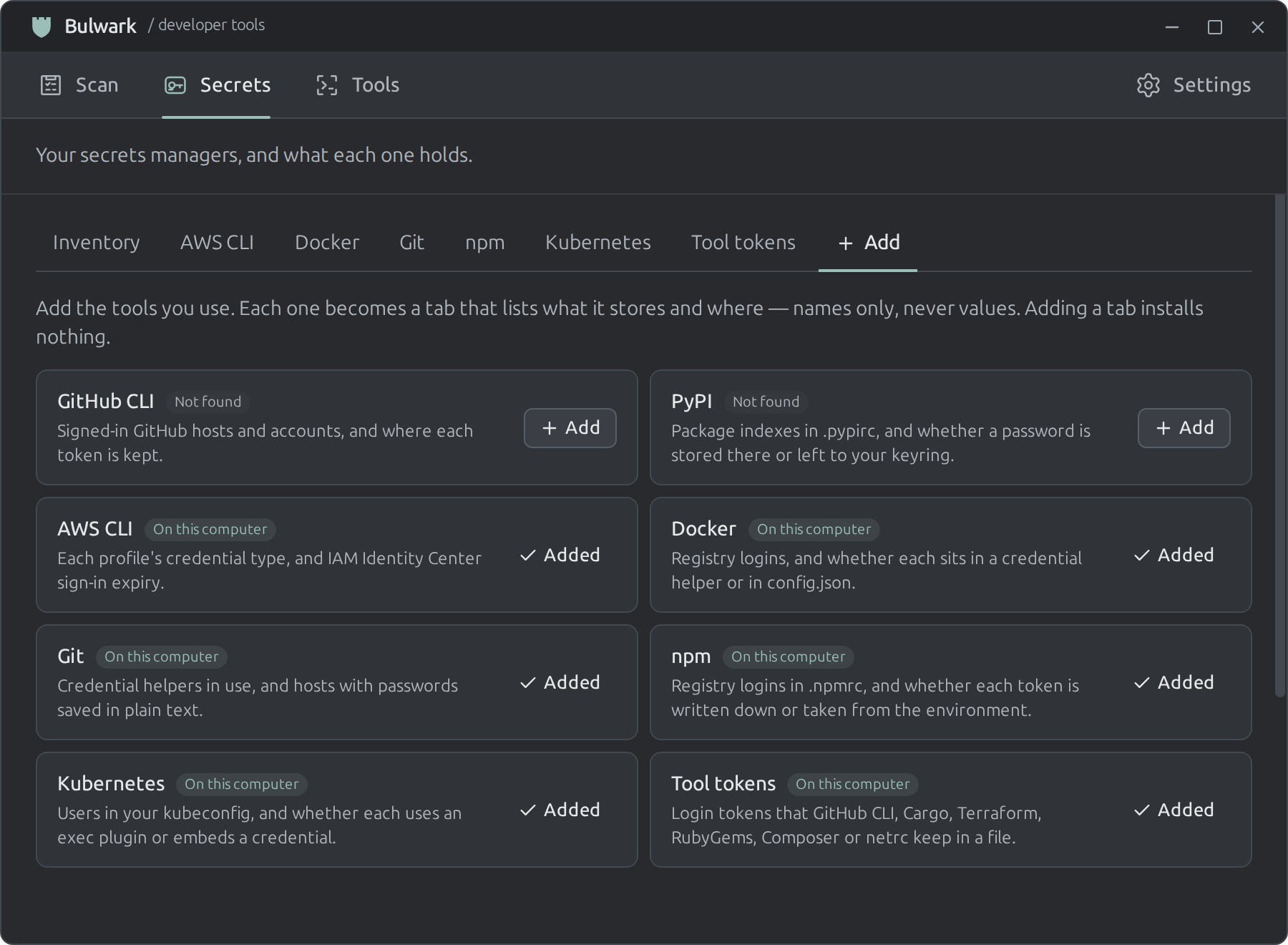
Bulwark never downloads or installs third-party software: when a tool is missing, its tab shows the command to run in your own terminal.
| Manager | What its tab lists | Read from |
|---|---|---|
| AWS CLI | Each profile's type — IAM Identity Center session, assumed role (with or without MFA), credential_process helper, or a static access key — and sign-in expiry | ~/.aws/config, ~/.aws/credentials, ~/.aws/sso/cache (expiry only) |
| Docker | Registries, and whether each login sits in a credential helper or inline in config.json | ~/.docker/config.json |
| Git | Credential helpers per host, and hosts with passwords saved in ~/.git-credentials (host names only) | ~/.gitconfig, ~/.config/git/config, ~/.git-credentials |
| GitHub CLI | Signed-in hosts and accounts, and whether each token is in the keychain or the file | hosts.yml (~/.config/gh, or %APPDATA%\GitHub CLI on Windows) |
| npm | Registry logins, and whether each token is written in the file or taken from an environment variable (${NPM_TOKEN}) | ~/.npmrc |
| PyPI | Package indexes, and whether a password is stored or left to your keyring | ~/.pypirc |
| Kubernetes | Kubeconfig users: exec plugin (and which), a key in a separate file, or a credential embedded in the file | ~/.kube/config |
| Tool tokens | Which of GitHub CLI, Cargo, Terraform, RubyGems, Composer and netrc keep a login token in a file, and how many — the same files Scan's CRED-009 checks, read by the same parser | Each tool's token file under your home folder |
The inventory
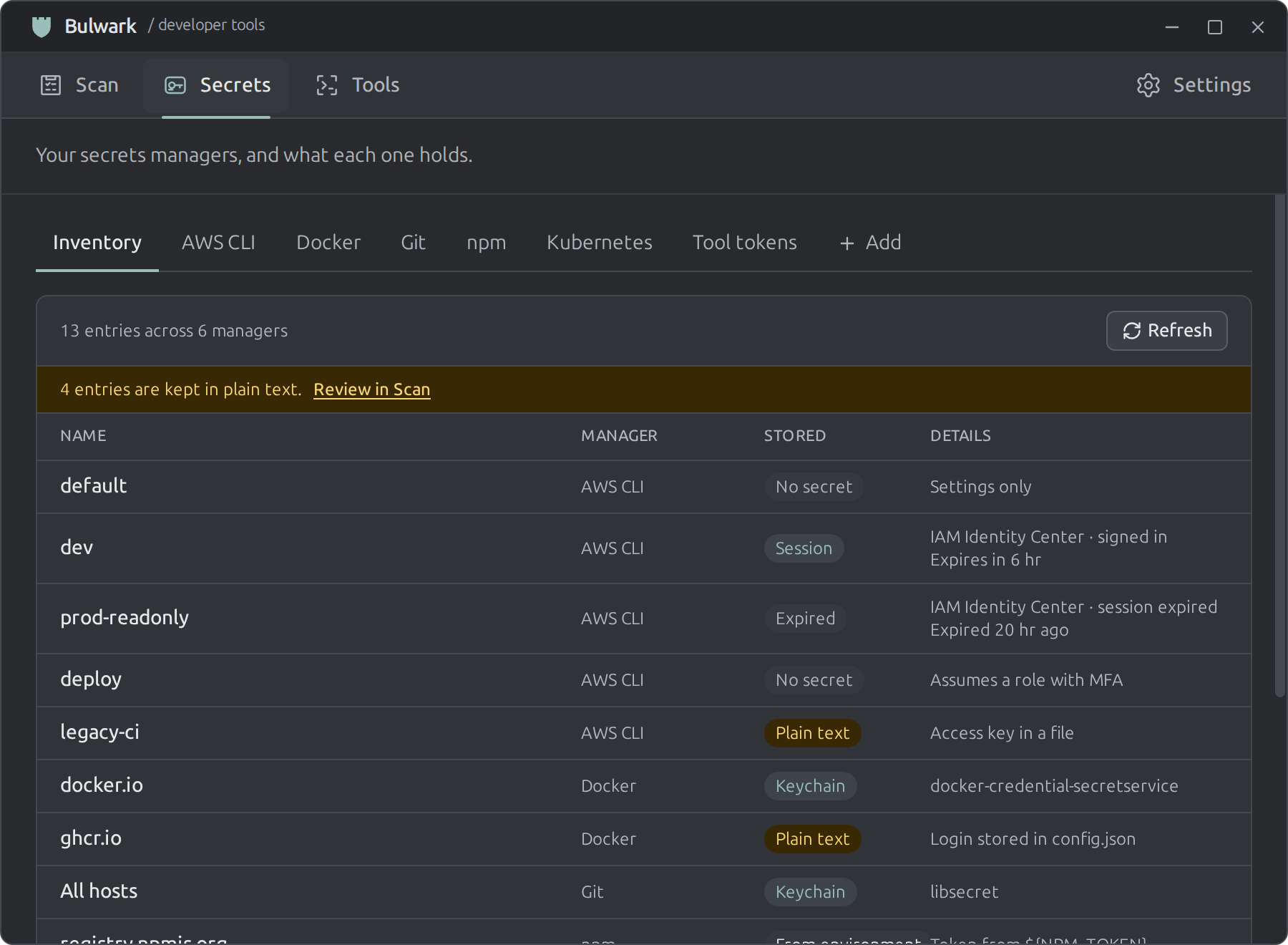
The Inventory tab combines every added manager into one table: name, manager, where it is stored, and details such as expiry. File-based managers are read automatically — every time you open Secrets, and whenever you add one — so the inventory reflects files changed in the meantime; the previous result stays on screen while it refreshes. They only parse the tool's own files, run nothing, and skip past values.
| Stored | Meaning |
|---|---|
| Keychain | Held by the OS keychain or a credential helper backed by one. |
| Session | A short-lived token the tool cached; Expired once its time has passed. |
| Helper | Fetched by an external program; where it keeps the secret is up to that program. |
| In memory | Git's cache helper: kept in memory for a while. |
| From environment | The file only references a variable such as ${NPM_TOKEN}; the value lives elsewhere. |
| Plain text | Written out in a readable file. Scan reports these with a fix; Review in Scan takes you there. |
| No secret | Configuration only, such as an assumed role or a plain profile. |
Organisation-identifying values are used for matching only — an SSO start URL links a profile to its cache entry and is never displayed. A missing tool shows "not found" with setup steps, never an empty, healthy-looking list.
What Secrets never does
No value is read into the app, displayed, copied or exported. Nothing signs you in, unlocks a vault, syncs, or revokes a credential. Rotation and provider administration stay in your own tools.