
Agent Security
Bulwark scans the AI coding assistants on your machine — Claude Code, Cursor, GitHub Copilot, OpenAI Codex, Gemini CLI, Aider, Continue, Windsurf, Cline/Roo and Amazon Q — for two classes of problem that ordinary host scanners don't look for:
- Secrets leaked into AI context. API keys, tokens, and connection strings pasted into a
CLAUDE.md, an agent's memory, an MCP config, a.env, or a session transcript. Anything an assistant can read is one prompt-injection away from being exfiltrated — and transcripts keep a copy on disk long after the conversation. - Dangerous agent configuration. Settings that a prompt injection can turn into code execution on your host, grounded in real, published attacks.
It's a first-class Agent Security tab in the desktop app — one of the four scanners, alongside Compliance, Antivirus and File integrity — and a bulwarkctl ai subcommand in the CLI. Its findings also roll up into the Overview, which is the one page that accounts for every scanner at once.
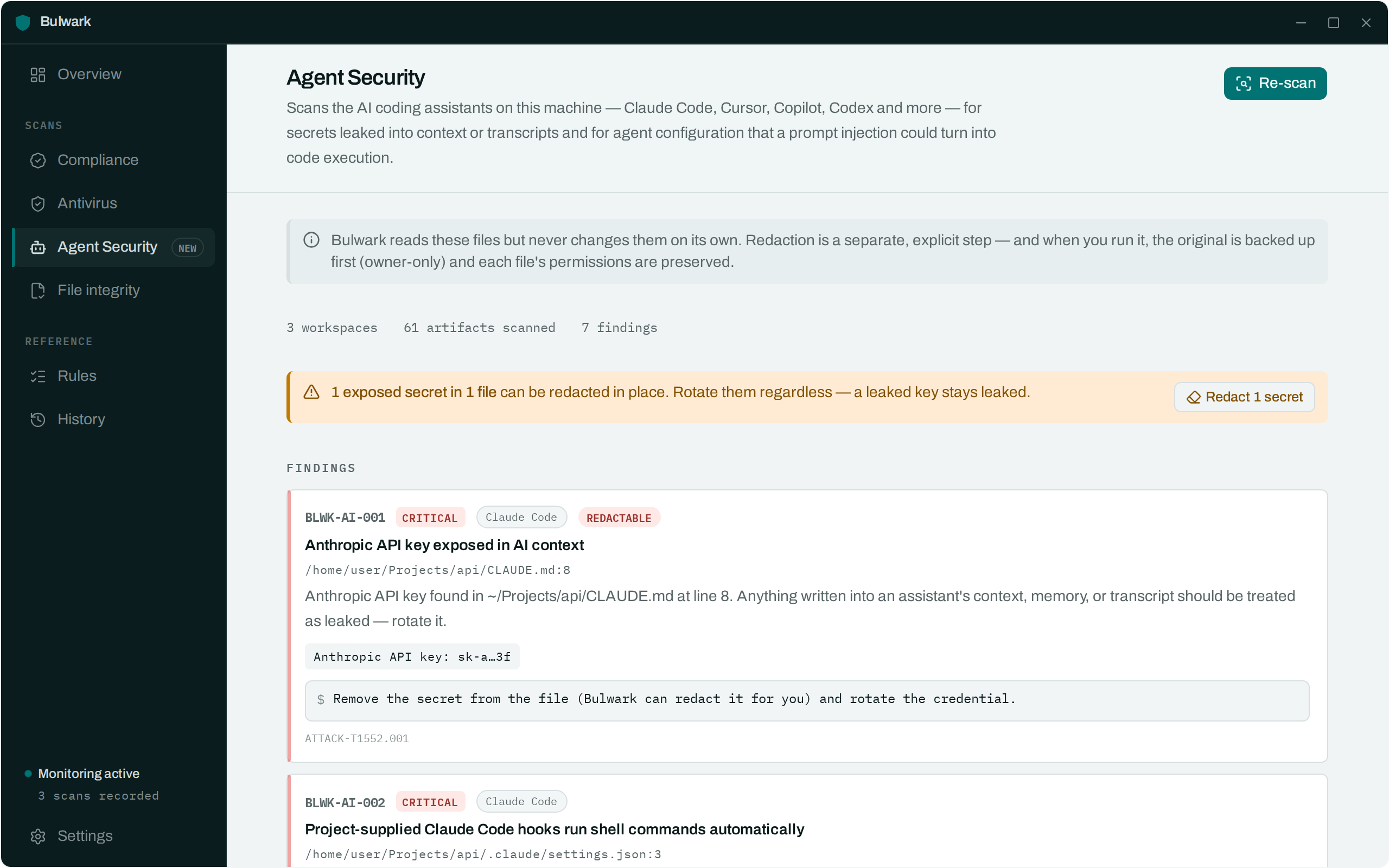
A scan reads real secrets. Treat its output accordingly.
Findings are stored and displayed with the secret masked (sk-a…3f), never in full, and the raw value is never written to the database or the logs. But the file paths a finding points at are real, so a screenshot of a live scan can still disclose where you keep things. The screenshots in this documentation are deliberately generated from fixtures, not from a real machine.
What it checks
| Rule | Severity | What it catches | Reference |
|---|---|---|---|
BLWK-AI-001 | Critical / Medium | A provider secret (Anthropic, OpenAI, GitHub, AWS, …) in an assistant's context, config, or transcript | T1552.001 |
BLWK-AI-002 | Critical | Project-supplied Claude Code hooks that run shell on session/tool events | CVE-2025-59536 |
BLWK-AI-003 | High | An MCP server launched via an unpinned npx/uvx package | T1195.001 |
BLWK-AI-004 | High | An MCP server using mcp-remote (command-injection ≤ 0.1.15) | CVE-2025-6514 |
BLWK-AI-005 | High | An MCP server wrapped in a shell interpreter (bash -c …) | T1059.004 |
BLWK-AI-006 | High | A permission allowlist that permits arbitrary execution (Bash(*), Bash(curl:*)) | T1059 |
BLWK-AI-007 | High | defaultMode: "bypassPermissions" — no approval prompts at all | T1059 |
BLWK-AI-008 | High | enableAllProjectMcpServers / enabledMcpjsonServers auto-enabling a repo's MCP servers | CVE-2025-59536 |
BLWK-AI-009 | Critical | VS Code chat.tools.autoApprove ("YOLO mode") | CVE-2025-53773 |
BLWK-AI-010 | High | VS Code Workspace Trust disabled | T1204.002 |
BLWK-AI-011 | High | A VS Code task set to run on folderOpen | T1204.002 |
BLWK-AI-012 | High | Hidden Unicode / bidi controls in an instruction file (the Rules File Backdoor) | Pillar Security |
BLWK-AI-013 | Medium | Prompt-injection-style phrases in an instruction file (heuristic) | T1566 |
BLWK-AI-014 | High | An ANTHROPIC_BASE_URL / OPENAI_BASE_URL override to a non-official host | CVE-2025-59536 |
BLWK-AI-015 | Medium | A plaintext credential file readable by group/other | T1552.001 |
BLWK-AI-016 | High | A secret-bearing file in a git repo with no .gitignore rule covering it | T1552.001 |
BLWK-AI-017 | High | Codex approval_policy = "never" + sandbox_mode = "danger-full-access" | T1059 |
BLWK-AI-018 | High | An MCP server connecting to a remote endpoint with a plaintext token in its config | T1552.001, T1071.001 |
BLWK-AI-019 | Critical | An MCP server running a privileged or host-mounting container (--privileged, -v /var/run/docker.sock, -v /:…) | T1610, T1611 |
BLWK-AI-020 | High | A filesystem MCP server granted an over-broad root (/ or your whole home directory) | T1083 |
These are native Rust detectors, not YAML rules — the same reason the ClamAV integration isn't a collector. Secret detection needs capturing regexes and redaction spans; the config checks parse MCP JSON and inspect files for invisible Unicode; none of that fits the flat condition DSL. They carry the same shape as a YAML rule all the same (id, severity, plain-language explanation, one-line fix, references) and the same discipline (every detector is unit-tested, including a benign no-false-positive case).
How workspaces are discovered
Because every developer's layout differs, the scanned workspace set is derived, not hardcoded:
- From your assistants' own records — the projects Claude Code has opened (
~/.claude/projects/). - A shallow sweep of common code roots —
~/Workspaces,~/Projects,~/src,~/dev,~/code,~/git, … — for directories carrying an AI marker (.claude/,CLAUDE.md,.cursor/,.mcp.json,AGENTS.md, …).node_modules,.git, and build trees are skipped. - Roots you add in the tab's settings, plus any you exclude.
Global $HOME tool state (~/.claude/, ~/.codex/, ~/.cursor/mcp.json, ~/.gemini/, …) is always included. The desktop app also runs a periodic background sweep and notifies you when a new secret or risky config appears — toggleable from the tab.
Redaction
Bulwark reads these files but never rewrites them on its own — finding a secret and removing it are two deliberate, separate acts, the same stance file-integrity baselining takes.
- Dry run first.
bulwarkctl ai redact(no flags) reports exactly which files would change and how many secrets each holds, touching nothing. - Apply explicitly.
bulwarkctl ai redact --apply(or the tab's Redact button) rewrites the files, replacing each high-confidence secret with an inert placeholder. Before overwriting, it writes a0600backup of every file it touches, and it preserves the original file's permissions on the rewritten copy. Only high-confidence provider secrets are redacted — the fuzzyKEY=valueheuristic is report-only.
Redaction removes the secret from disk; it can't un-leak it. Rotate any exposed credential.
CLI
# Scan every discovered workspace + your home-directory tool state.
bulwarkctl ai scan

# Scan just one project (skips the whole-machine sweep).
bulwarkctl ai scan --target ~/work/service

# Add or exclude discovery roots.
bulwarkctl ai scan --root ~/oss --exclude ~/Projects/huge-monorepo

# Preview, then apply, redaction. A 0600 backup of each file is kept.
bulwarkctl ai redact
bulwarkctl ai redact --apply
ai scan exits non-zero on findings (2 for a critical, 1 for medium/high), so it drops into cron or CI the same way bulwarkctl scan does.
Stopping a scan
A sweep across a machine with many workspaces takes a while, so every scan can be stopped from the UI. Stop is not cosmetic: it stops the engine mid-walk (and, for the antivirus scan, kills the clamscan child process rather than leaving it churning the disk in the background).
A stopped scan is partial, and Bulwark treats it that way rather than pretending otherwise:
- The results are labelled as partial and are not persisted. A half-finished sweep never replaces a complete picture on disk.
- Nothing it didn't reach is marked as passing. The rule engine only records the checks that demonstrably ran, so stopping a scan can never resolve a finding it never actually re-tested.